A WhatsApp chatbot that answers from your website
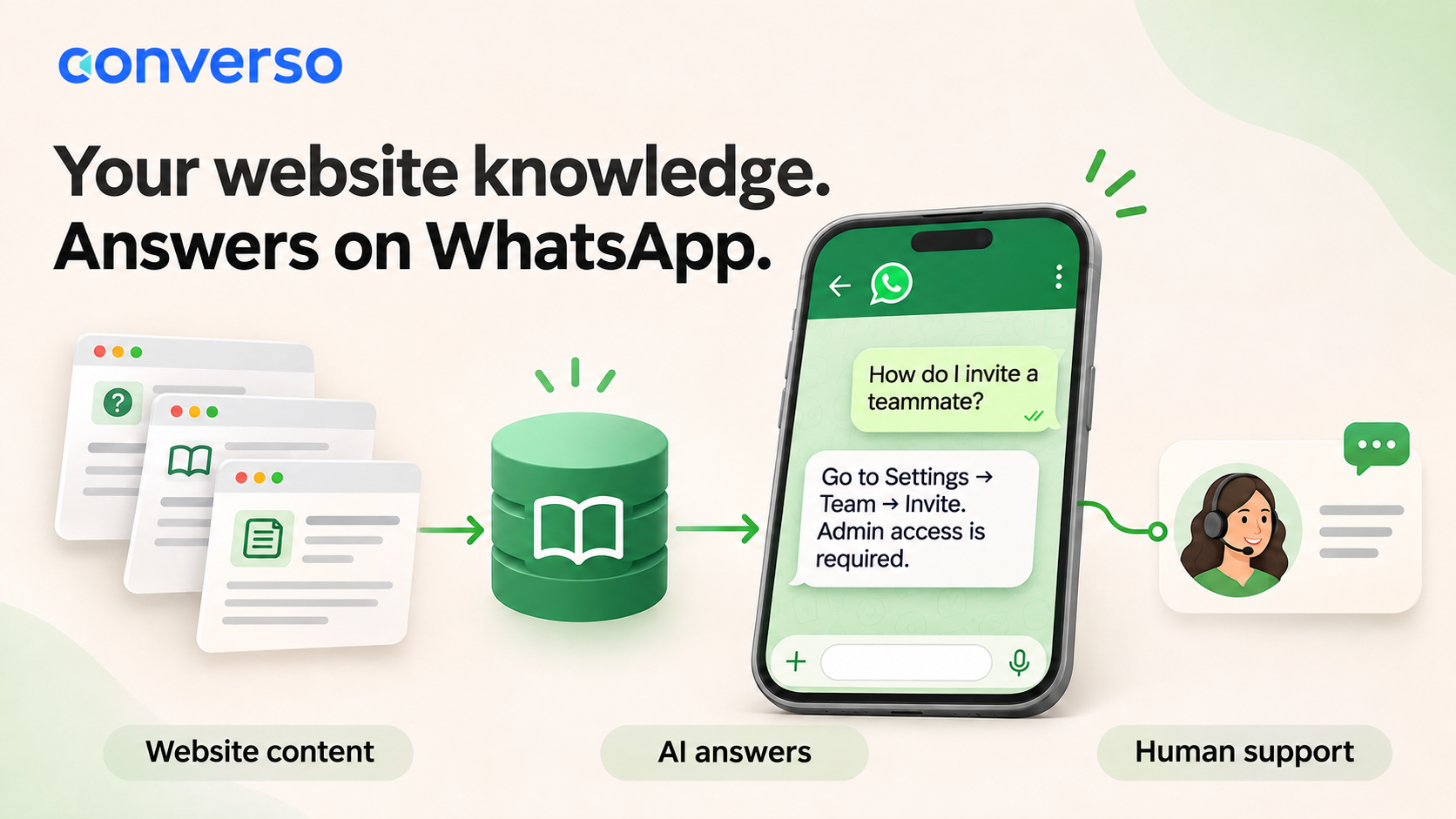
A WhatsApp chatbot that answers from your website lets customers ask questions in their own words and get replies based on your product pages, help articles and FAQs. With Converso, you import that content into a knowledge base, connect it to an AI agent and use it for both WhatsApp and your website widget. When a conversation needs a person, your team takes over in the shared inbox.
This is useful when your team keeps answering questions that your documentation already covers: how to invite a colleague, where to find a setting, or what a plan includes. Here is how to set it up, what to test and where human support still matters.
See a website answer and human handoff in 29 seconds
Watch the 29-second WhatsApp chatbot demo.
Illustrative hotel demo: a guest gets an answer from website content, then reception takes over with the conversation and handoff summary. Silent video with on-screen text; fictional hotel data.
How website content becomes a WhatsApp answer
- Import your content. Add an individual page URL or crawl a website into a Converso knowledge base.
- Connect the knowledge base to your workspace. The workspace brings together the AI agent, your support team and its messaging channels.
- A customer asks a question. The agent uses relevant imported content to compose a reply.
- Your team handles the exceptions. Staff can continue the conversation in the inbox when human help is needed.
The same knowledge base can support the website widget and WhatsApp. Customers use the channel that suits them, while your team maintains the source material in one place. Read more about Converso’s AI agents and WhatsApp support.
Start with the pages your support team actually uses
A useful first import is a small, accurate set of support pages. Include setup instructions, current plan details, troubleshooting steps and common questions. Remove conflicting or obsolete information before importing it.
For a SaaS business, start with onboarding and account administration. A guide explaining how to invite a teammate gives the agent something concrete to answer from. A marketing sentence saying your product “makes collaboration effortless” does not!
- Good source: an article listing the steps and permissions needed to invite a teammate.
- Needs more detail: a feature page that mentions team collaboration without explaining how it works.
- Needs a person: a request to investigate a particular customer’s failed invitation or change their permissions.
Import only material you intend to use in customer-facing answers. A knowledge base is a source for the agent, so internal notes and customer-specific information need particular care.
Set up a website-trained WhatsApp chatbot in Converso
1. Add your website as a knowledge source
Open your knowledge base, select Sources, then Add source. Choose URL for one page or Domain for a website crawl. Domain imports are available on Pro and Business plans.
For a domain import, enter the site URL and review the preview before confirming the crawl. Check that the discovered pages contain the support information you want. Each domain source takes up to 100 pages; larger sites need additional sources for the remaining content.
2. Check that the imported content is ready
Wait for the source to reach READY, then use View content to inspect what was imported. Check failed-page counts and errors instead of assuming that every page was collected. Keep the intended sources active.
If a key answer is missing, add a focused FAQ or another page. When your website changes, use Re-sync on the relevant source and check the result. Treat the imported content as something to maintain, rather than assuming a website edit immediately changes the agent’s answers.
3. Connect the agent and WhatsApp to your workspace
Use the knowledge base for the workspace’s AI agent and connect your WhatsApp Business channel through Converso’s setup flow. WhatsApp is included on Pro and Business. Your website widget can use the same workspace and knowledge base.
Choose a clear handoff message so customers understand when their conversation is being passed to the team. Keep it specific: “I’m passing this to our support team so they can help with your account” sets a useful expectation without promising a response time you cannot guarantee.
4. Test an answer and a handoff on both channels
Send a question whose answer appears in an imported article. Repeat it in different words on WhatsApp and the widget. Check the answer against the source rather than judging only whether it sounds convincing.
Then ask a question outside the documentation and explicitly ask for a person. Verify that the handoff reaches your team and that staff can read the conversation and reply. The shared inbox is where your team handles those conversations.
An example: onboarding questions for a software product
The following is an illustrative test, not a customer result or a guaranteed response.
Source article: “Only workspace admins can invite teammates. Open Settings, select Team, choose Invite and enter their email address.”
Customer: “How do I add someone to my workspace?”
Expected answer: Explain the invitation steps and mention that admin access is required.
Follow-up: “I’m an admin, but the invitation still fails. Can someone look at my account?”
Expected next step: Hand the conversation to the support team for investigation.
Repeat this exercise for your five most common questions. Include one outdated page, one missing answer and one account-specific request in your checks. These cases reveal gaps that a simple greeting test will miss.
What does it cost?
Converso Pro is $24 per month on monthly billing, with WhatsApp, website crawling and 100 monthly credits. Business is $59 per month on monthly billing, with 400 monthly credits. Paid plans include unlimited team seats rather than charging per seat. The Free plan does not include WhatsApp or domain crawling. See Converso’s plans and pricing for current details.
Allow credits for both importing knowledge and answering customers. A domain preview costs one credit; the crawl costs one credit per started ten pages. For example, one preview followed by a 30-page crawl uses four credits. A single-page URL import costs one credit.
An AI conversation credit covers a 24-hour window with up to 20 AI replies. More replies or another window can consume more credits, so 100 credits should not be treated as 100 unlimited conversations. Meta’s applicable WhatsApp messaging charges are separate from your Converso subscription.
Where this approach works best
Website-based answers work best for questions your published content can resolve: onboarding instructions, feature explanations and documented troubleshooting. They do not give the agent access to a customer’s live account, order status or private billing records.
Use the team handoff for investigations, exceptions and actions that require a person. Review conversations to find missing or unclear documentation, then update the knowledge sources. Grounding answers in your content helps keep the agent focused, but you should still test its accuracy.
Frequently asked questions
Can one knowledge base answer on WhatsApp and my website?
Yes. Converso can use the same knowledge base for the AI agent serving WhatsApp and the website widget. Your team can handle conversations from those channels in its workspace inbox.
Does the chatbot automatically know when my website changes?
Check and re-sync the relevant knowledge source after changing your website. Verify that the updated content has imported successfully before relying on the new answer.
Can it answer questions about a customer’s account?
It can explain account-related instructions documented in your knowledge base. Importing a website does not connect the agent to private account data or enable it to make account changes. Pass those requests to your team.
Do I need the paid plan for WhatsApp?
Yes. Converso includes WhatsApp and domain crawling on Pro and Business. The Free plan lets you explore webchat and supported knowledge sources before choosing a paid plan.
Put your existing documentation to work
Start with a handful of accurate help pages, test the questions customers already ask and make sure the handoff works for your team. You can then expand the knowledge base as you learn which answers are missing.
Create your Converso account or talk to us about using your website content for WhatsApp support.